

Owner, Co‑Founder, and Chair
Todd is responsible for Four Kitchens’ long-term success.
September 11, 2025
Higher education faces unprecedented challenges (and opportunities!) in the digital age. Institutions must continually attract and retain students, deliver intuitive and personalized online experiences, and streamline operations in an increasingly competitive landscape. Artificial Intelligence is not just a helpful tool, but a strategic imperative to address these challenges effectively.
AI adoption among higher-ed institutions has surged in the last year:
- 65% of higher ed institutions use AI in their marketing and enrollment efforts in 2025 — a significant jump from 40% in 2024.
- 69% report improved workflow efficiency directly due to AI.
- Nearly half (48%) believe AI positively impacts enrollment funnels.
- 36% report a high or very high ROI from AI-enabled content optimization.
These data represent tangible opportunities for institutions to increase efficiency and engage more meaningfully with prospective and current students.
The question facing higher-ed institutions today isn’t whether or not to use AI, but how quickly and effectively it can be integrated into websites, marketing strategies, and operational workflows to remain relevant and competitive.
Integrating AI effectively requires careful planning and thoughtful execution. Amidst considerable hype and overwhelming vendor promises, this guide provides practical, actionable advice to help higher-ed leaders like you cut through the noise and adopt AI where it truly matters.
Who should read this?
This guide is specifically crafted for higher education professionals who understand the strategic importance of AI but seek clear, practical guidance for applying AI to solve real-world challenges:
- Website managers and digital teams who want to deliver engaging and intuitive digital experiences while maintaining a manageable backlog.
- Marketing and communications professionals who aim to attract and convert prospective students with personalized messaging and optimized user journeys.
- IT leaders who need reliable solutions that integrate seamlessly with existing technology without introducing security issues or bugs.
- Enrollment managers and admissions directors who are accountable for driving strategic enrollment growth, boosting conversion rates, and achieving enrollment targets.
At Four Kitchens, we bring two decades of expertise in web strategy and innovation, partnering with world-class organizations like Yale University, The Economist, and NBC. Our team has consistently pushed the boundaries of what’s possible online, helping institutions like yours not only enhance their websites but fundamentally transform their digital strategies and experiences.
In this guide, we’ll share in-depth insights from our real-world collaborations. Our aim is not just to introduce concepts but to empower you with actionable strategies, clear steps for implementation, and practical insights to navigate the complexities of adopting AI.
Key takeaways
This guide outlines six ways AI can transform higher education websites and digital experiences:
- Conversational AI: Chatbots and virtual assistants. These tools improve access to information, reduce support requests, and free staff to focus on high-impact, strategic work.
- Personalization: Tailored content experiences. AI tailors content in real time based on user behavior and intent, increasing engagement, time on site, and conversion.
- Smarter search: Intent-based discovery. AI-enhanced search understands the context behind user queries, delivering faster, more accurate results than traditional keyword filtering.
- Content creation: Efficient, consistent, and scalable. AI accelerates content creation, editing, and repurposing — saving time, reducing manual effort, and ensuring consistency at scale.
- Predictive analytics: Insights that improve student success. AI identifies student trends and risks early, enabling timely interventions that improve retention and inform strategic planning.
- Inclusive design: Multilingual and accessible experiences. AI supports accessibility and multilingual content, helping institutions serve diverse audiences and create more equitable digital experiences.
This guide also emphasizes how:
- AI solutions often overlap, enabling integration across teams, departments, and processes for comprehensive digital transformation.
- Successfully integrating AI goes beyond technology, requiring strategic collaboration, cultural openness, and a willingness to adapt workflows and mindsets.
High-impact AI use cases
1. Conversational AI: Chatbots and virtual assistants
Conversational AI has rapidly become an indispensable part of digital strategy for higher education. Today’s students (and their families), faculty, and staff expect fast, accurate, and intuitive answers to their questions, no matter the time of day. Chatbots meet that demand, providing immediate support while reducing the burden on administrative teams.
Universities handle thousands of repetitive inquiries each year about admissions deadlines, financial aid, course offerings, campus logistics, and more. Responding to each one manually, whether by email or phone, is time-consuming and unsustainable at scale. Chatbots and virtual assistants relieve this pressure by providing 24/7 self-service, resolving routine questions quickly and consistently, and freeing staff to focus on strategic, high-touch interactions.
- Students love them! University chatbots have a 90% student satisfaction rate due to timely, intuitive interactions that directly answer their needs.
- Operational efficiency increases across departments. By resolving common questions automatically, chatbots reduce support requests and lighten staff workloads.
- Data collected from chatbots provide valuable insights. Interaction trends help institutions identify knowledge gaps, improve digital services, and proactively address common concerns.
- Their impact on marketing and enrollment is growing. According to the 2025 Marketing and Enrollment Management AI Readiness Report, 79% of higher ed professionals expect chatbots will significantly impact marketing and enrollment in the next two years.
Real-world example: University of Michigan’s AI platforms
The University of Michigan has launched multiple conversational AI platforms, including:
- UM-GPT provides secure access to commercially available large language models (LLMs), including some that are run on premises. This approach avoids vendor lock-in, keeps student and faculty data out of “free” LLMs’ training models, and ensures equitable access for those who can’t afford monthly AI subscription fees.
- U-M Maizey is a codeless platform for creating custom AI experiences. Faculty, for example, can integrate Maizey with Canvas (the university’s learning management system) to set up course-specific AI tutoring and to answer questions about assignments, deadlines, and exams. As of Spring 2025, there were more than 3,500 Maizey instances in production across academic departments and offices such as procurement and HR.
- Go Blue is a mobile AI assistant that helps students navigate campus life, including class information, dining hall menus and hours, student organizations, and campus events.
Real-world example: Yale University’s It’s Your Yale chatbot
Yale partnered with Four Kitchens to relaunch It’s Your Yale, a comprehensive resource for the Yale community on campus services, workplace essentials, and policies. Central to the relaunch was a chatbot designed to efficiently guide users through extensive content.
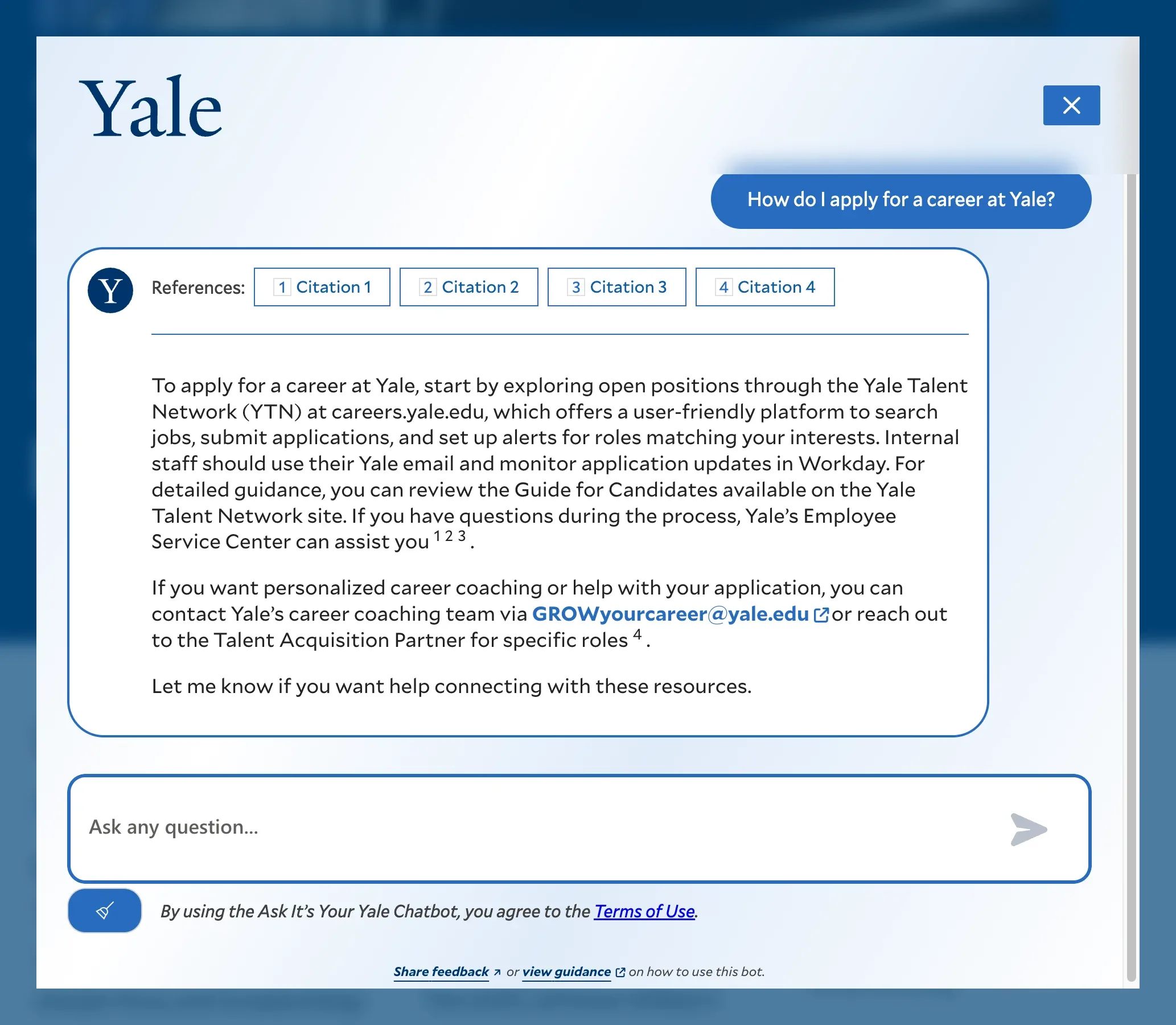
To ensure reliability and accuracy, Yale conducted meticulous testing involving approximately 500 frequently asked questions. Responses were evaluated for both usability (“Was using the chatbot pleasant and useful?”) and accuracy. The chatbot did not launch until it consistently met an 80% usability threshold and a 90% accuracy standard. To streamline this rigorous testing process, which spanned multiple departments, Yale developed InReview, a custom-built tool enabling reviewers to quickly verify, approve, or flag chatbot responses.
Additionally, the chatbot integrates content from multiple Drupal websites across Yale, providing accurate, institution-wide information. This careful, user-centered approach significantly reduces administrative workloads, allowing Yale staff to focus on strategic priorities while delivering more efficient, intuitive access to university resources.
Best practices for effective chatbots
When implementing chatbots at your institution, keep these best practices in mind to maximize impact and adoption:
- Maintain quality content. A chatbot is only as good as the content it’s trained on. Make sure your content is accurate, up-to-date, and easy to understand. Then check it for proper structure, document hierarchy, formatting, and accessibility compliance. When your content passes all of these tests, it’s a triple win: people understand it, it’s accessible, and AI will use it to generate accurate answers.
- Create a robust testing program. Work with knowledgeable staff members to build a list of frequently asked questions. Then grill the chatbot. Does it answer them accurately? Is the level of detail just right? Is the tone appropriate? Does it try to be too helpful (like offering to write an admissions essay for you)? Set benchmarks for accuracy, usability, tone, and helpfulness, and work towards them.
- Integrate with existing systems. Effective chatbots should integrate smoothly with your existing campus infrastructure, such as the content management systems that store your content (Drupal, WordPress) or learning management systems (Canvas, Moodle) that organize course information.
- Foster communities of practice. Create oversight teams that include departments like IT, marketing, enrollment, academic affairs, and student services. These groups can help share knowledge, create alignment with institutional goals, and ensure the quality and accuracy of chatbots and other AI tools.
- Offer customizable experiences. Allow users to select different LLMs (OpenAI, Gemini, Anthropic), tones of voice, or areas of knowledge. You can even create a library of custom GPTs configured for specific use cases. This flexibility increases user comfort and trust.
- Ensure data privacy and security. Prioritize solutions that adhere to privacy standards (GDPR, FERPA) and securely manage sensitive student information. Make sure the AI tools you select don’t use your data for training purposes. Consider on-premises or open-source solutions like Llama that won’t send your data to any third-party services or servers.
Actionable steps for implementing chatbots
- Conduct a needs assessment.
- Survey students, faculty, and staff to identify the most common inquiries and areas ripe for automation.
- Evaluate historical support data (emails, call logs, help desk tickets) to spot trends in questions or concerns.
- Define success.
- What goals do you want to accomplish with your chatbot? What problems are you trying to solve? How will you measure success?
- Consider using personas to help delineate your audiences and understand their goals and challenges.
- Choose the right AI platform.
- Compare leading platforms (e.g., OpenAI, Gemini, Llama) on factors like compatibility, cost, scalability, privacy compliance, and ease of integration with your existing infrastructure.
- Conduct pilot projects or proof-of-concept demonstrations to test whether the selected platform fits your institutional needs and workflows.
- Prepare your knowledge base.
- Your chatbot is only as good as your content, so you need to review your content for accuracy, completeness, quality, and structure.
- Collaborate closely with academic departments, admissions teams, and student services to ensure all their content is comprehensive and up-to-date. Any missing content should be identified and scheduled for creation.
- All content should be clear and unambiguous. Titles and headings should stand on their own without the need for context (what section they’re in, what headings came before, etc.). Lists, tables, and other elements should be clearly labeled. Any web-based content should use proper markup with proper document hierarchy.
- Create a governance model for regularly updating and re-indexing content to maintain accuracy and relevance.
- Test your chatbot.
- Collaborate with departments and teams to create a list of critical or frequently asked questions that must be answered correctly by the chatbot.
- Establish reasonable benchmarks for testing. For example, 90% of the questions are answered correctly.
- Define what a “correct” answer looks like. We suggest asking yourself: “Would I send this answer to someone who asked me this question?” A correct answer (1) should sound like it comes from someone who works at your institution and (2) would actually help the person asking. A wrong answer has old information, missing steps, broken links, or confusing language.
- Fine-tune your content and system prompts until the chatbot consistently reaches its benchmarks. This may require rewriting some content or adding missing content.
- Launch in phases.
- Begin by deploying the chatbot with limited, targeted functionality in key departments or user groups, allowing you to manage initial expectations and troubleshoot effectively.
- Gather and analyze feedback, usage data, and user satisfaction metrics to identify areas for improvement.
- Iterate and expand gradually.
- Continuously refine chatbot capabilities based on feedback and emerging needs. Regularly communicate updates and improvements to users, reinforcing transparency and trust.
- Gradually expand the chatbot’s scope, scaling functionality across more departments, topics, or platforms once initial goals are met and trust is established.
- As you add content, add questions to test it.
- Periodically run your “questions test” to ensure your chatbot still reaches your benchmark.
2. Personalization: Tailored content experiences
Today’s students don’t just prefer personalization. They expect it.
From social media feeds to online shopping, their digital lives are filled with experiences that adapt to their interests, behaviors, and intent. Higher education websites must meet these expectations to remain competitive.
AI-driven personalization enables institutions to deliver dynamic content, calls to action, and recommendations that reflect each student’s individual journey — not just their demographics. By analyzing user behavior and context in real time, these systems surface the most relevant information, reduce friction in the decision-making process, and drive deeper emotional connections. The result: higher engagement, increased application and enrollment rates, and more strategic insight into prospective student behavior.
- Personalized content significantly increases conversions by guiding users toward meaningful next steps
- Adaptive experiences foster trust and satisfaction by showing students they’re understood.
- Behavioral data provides valuable insight for refining recruitment and communications strategies.
- According to the 2025 Marketing and Enrollment Management AI Readiness Report, 74% of respondents believe students will increasingly demand personalized communication and tailored outreach.
- Additionally, over a third (35%) said personalized marketing is the greatest area of opportunity for adopting AI-driven technology at their institution.
Implementation example: ProgramGuide AI’s personalized program discovery experience
ProgramGuide AI is a thought experiment created by Four Kitchens to explore how AI could transform the academic program discovery experience. Unlike conventional program finders that rely on static lists and basic filters, ProgramGuide AI guides prospective students through interactive, conversational exchanges that dynamically personalize the discovery process according to each student’s unique interests, academic goals, and preferences.
As students engage with ProgramGuide AI, it continuously refines their experience, immediately surfacing tailored program recommendations and personalized calls to action. These interactions seamlessly integrate with CRM systems, allowing universities to track student engagement and deliver timely, personalized follow-up communications to nurture prospects.
This innovative approach significantly improves student engagement, builds confidence in program selection, and generates valuable insights into student behavior that universities can use to optimize recruitment strategies and outcomes.
Actionable steps for implementing personalization
- Understand your audience.
- Clearly define key audience segments based on behavior, demographics, and known interests. Examples include prospective students, international students, transfer students, and graduate prospects.
- Use historical website data and CRM analytics to identify common student journeys, pain points, and engagement triggers.
- Create content specific to those audiences — or use AI to generate it on the fly.
- Configure AI tools to generate relevant, compelling content modules — program descriptions, student testimonials, video clips — tailored specifically to each identified audience segment. (This approach is discussed in “Content creation: Efficient, consistent, and scalable” later on.)
- Use a personalization tool like Lytics to dynamically update content blocks, headlines, and calls to action as the user navigates the site — or when they return.
- Integrate personalization with your CRM.
- Integrate your website with your CRM (e.g., Salesforce, HubSpot, Slate) to ensure on-site interactions are tracked.
- Use your CRM to automate personalized nurturing campaigns triggered by specific behaviors, such as filling out a form or clicking an application link.
- Measure, analyze, and optimize.
- Regularly track and analyze performance metrics — such as engagement rates, conversion rates, click-through rates, and user feedback — to evaluate personalization effectiveness.
- Continuously refine and optimize personalization strategies based on insights from data analysis, ensuring the approach remains fresh, relevant, and highly targeted.
3. Smarter search: Intent-based discovery
University websites serve a wide range of audiences, each with unique questions and goals: students (both current and prospective), faculty, staff, alumni, and researchers — to name a few. Traditional keyword-based search often fails to meet their needs, surfacing irrelevant results or dead ends that diminish trust in your digital experience.
AI-enhanced search solves this by interpreting natural language and understanding user intent, enabling more accurate, contextual responses. Whether a student asks, “What degrees do you offer in sustainability and business?” or searches for “faculty housing policy,” AI tools deliver meaningful, tailored results — not just matching words, but understanding purpose.
- AI search reduces friction and frustration, improving the overall user experience.
- Contextual results paired with relevant calls to action increase conversions and engagement, turning casual visitors into applicants.
- Fewer support requests free staff to focus on strategic, high-impact work.
- Search data provides valuable insights to inform content strategy and navigation improvements.
By transforming search into a dynamic discovery experience, AI helps institutions better support their users, uncover intent, and turn simple queries into meaningful interactions.
Emerging trends: Google’s AI Mode and conversational search
Google’s AI Mode highlights the web’s evolution towards conversational search. Users increasingly approach search engines with complex, conversational-style queries, reflecting a fundamental shift in how people expect digital platforms to respond.
Institutions adopting intelligent, conversationally tuned search capabilities position themselves ahead of competitors by aligning their digital strategies with evolving user expectations. Additionally, structured data and strong SEO practices become even more critical, as they directly impact your website’s visibility and the effectiveness of intelligent search tools.
Implementation example: ProgramGuide AI’s conversational approach to search
Our ProgramGuide AI concept explores a sophisticated approach to academic search , moving beyond traditional keyword queries. It combines conversational AI with semantic understanding to interpret students’ complex, natural-language queries. For example, when a student asks, “What degrees do you offer for someone interested in video games?” ProgramGuide AI matches relevant programs, even if not explicitly named, such as Interactive Media or Digital Arts.
By leveraging both conversational context and structured filters, ProgramGuide AI continuously refines search results, making the exploration of academic offerings intuitive, engaging, and deeply personalized. This advanced approach helps students quickly find suitable programs, leading to higher engagement and stronger enrollment outcomes.
Actionable steps for implementing AI-enhanced search
- Audit your current search performance.
- Analyze search queries and user feedback to identify areas where traditional search methods consistently fall short.
- Document frequent pain points and recurring user frustrations.
- Implement semantic and natural language understanding.
- Deploy an AI-powered search engine such as Algolia or custom AI tools leveraging OpenAI or Gemini to interpret natural language and context-sensitive queries.
- Prioritize user-friendly interfaces that intuitively guide users toward meaningful results.
- Integrate lead-capture tools.
- Embed contextually relevant forms, prompts, or calls to action directly within search results pages to proactively engage users.
- Test various messaging and placement strategies to optimize lead capture and user engagement effectively.
- Measure, analyze, and optimize.
- Regularly review and analyze search query data, identifying emerging search trends, queries not yielding satisfactory results, and opportunities to refine AI search models.
- Leverage machine learning to continuously improve accuracy, relevance, and user satisfaction over time.
- Continuously improve SEO and content strategy.
- Adopt robust SEO best practices and structured data standards (like Schema.org) to complement intelligent search capabilities effectively.
- Update and refine your content strategy to reflect evolving user search patterns, queries, and expectations.
4. Content creation: Efficient, consistent, and scalable
Creating high-quality content at scale is one of the biggest challenges higher ed teams face. Websites, social media, email campaigns — every channel demands timely, tailored content for a wide range of audiences. But lean web and marketing teams are stretched thin, leading to bottlenecks, inconsistencies, and missed opportunities.
AI-assisted content creation offers a path forward. These tools dramatically reduce manual workloads while improving consistency, accelerating production, and empowering staff to focus on strategy, storytelling, and brand voice.
Rather than fully automating content, AI helps teams work smarter by drafting initial content from structured data, generating summaries, adapting messages across channels, and checking for consistency. Staff remain firmly in control, reviewing and refining outputs to ensure quality, accuracy, and tone — but with far less effort than starting from scratch.
- AI reduces time spent on repetitive content tasks like drafting, summarizing, editing, and adapting content for different platforms.
- It enhances consistency and quality by evaluating readability, checking for accessibility compliance, and ensuring alignment with institutional voice, tone, and style guidelines.
- It can automatically generate alt text, meta descriptions, summaries, and key takeaways, boosting both SEO performance and accessibility.
- It streamlines repurposing by adapting content across channels such as newsletters, social media, and internal documentation, minimizing duplication of effort.
- It supports large-scale personalization by generating tailored content variations for different audiences. For example, 100 programs × 10 segments = 1,000 pieces of content — a challenge AI can help make manageable.
- According to the 2025 Marketing and Enrollment Management AI Readiness Report, content generation is the most widely used and effective AI use in higher ed marketing. Nearly half (47%) of respondents rated it effective or very effective.
- Additionally, 79% of respondents said AI-powered content creation will significantly impact enrollment strategies within the next two years.
AI isn’t a replacement for human creativity. With the right workflows, it’s a force multiplier that frees teams to spend more time doing what they do best: connecting with audiences through clear, compelling storytelling.
Implementation example: ProgramGuide AI’s hybrid content creation approach
ProgramGuide AI demonstrates how institutions can smoothly integrate AI-assisted content creation into their existing workflows. Rather than completely automating content production, ProgramGuide AI pairs generative AI technology with modular, pre-approved content, including official program descriptions, student testimonials, career outcomes, and real-world industry insights.
The system automatically generates informative and persuasive first drafts directly within the CMS (Drupal, WordPress). Editors then quickly review, refine, and publish the content, maintaining full control over accuracy and institutional voice. Over time, the AI learns the institution’s preferred tone and style from editorial refinements, steadily improving draft quality and further reducing manual editing efforts.
This hybrid approach accelerates content production, preserves editorial standards, and frees staff to focus strategically on high-value tasks and engagement activities.
Actionable steps for implementing AI-assisted content creation
- Evaluate suitable AI editing platforms.
- Research and test AI-driven editing tools (e.g., Writer, Grammarly, Hemingway Editor, Claude) compatible with your existing CMS or content workflows.
- Assess tools based on ease-of-use, accuracy, integration capabilities, and adaptability to institutional style guides and standards.
- Develop comprehensive editorial and content guidelines.
- Clearly articulate readability benchmarks, tone, voice, brand alignment, accessibility standards, and content objectives.
- Ensure your guidelines are detailed enough for AI tools to apply them effectively. This will reduce the need for extensive manual revisions.
- Adopt a hybrid AI-human workflow.
- Implement an initial phase where AI tools generate first drafts or initial outlines.
- Pair AI-generated outputs with human editors responsible for reviewing, refining, and approving all content before publication, ensuring quality and consistency.
- Establish regular accessibility and compliance checks.
- Leverage AI tools for preliminary alt text generation, image captioning, and accessibility summaries.
- Follow up with human oversight to ensure contextual accuracy, compliance with accessibility regulations, and institutional standards.
- Measure performance and continually optimize.
- Regularly analyze key performance indicators (e.g., content production speed, content engagement metrics, accessibility compliance) to evaluate the effectiveness of your AI-assisted content workflow.
- Continually refine AI tool settings, editorial guidelines, and human oversight protocols based on data-driven insights.
Additional strategic use cases
5. Predictive analytics: Insights that improve student success
With growing pressure to improve enrollment and retention outcomes, predictive analytics have become one of the most valuable strategic tools in higher education. Traditional decision-making — often based on historical trends, anecdotal evidence, or gut instinct — lacks the precision and speed institutions now require. AI-powered analytics enable universities to anticipate behaviors, uncover risks, and act on opportunities more effectively than ever before.
By analyzing vast datasets that include application histories, academic records, and digital engagement, predictive models can identify enrollment trends, flag students at risk, and optimize outreach strategies. This allows institutions to proactively intervene, allocate resources more efficiently, and ultimately improve student outcomes.
- Predictive analytics help institutions forecast enrollment trends with greater precision, allowing for better planning, smarter marketing spend, and more strategic outreach.
- They identify at-risk students early by analyzing behavioral and academic patterns, enabling timely, personalized interventions that improve retention and success.
- Institutions can use predictive insights to anticipate course demand, allocate faculty and support services accordingly, and optimize long-term resource planning.
- They enhance campaign performance by linking user behavior with recruitment outcomes, allowing teams to fine-tune messaging and targeting in real time.
- According to the 2025 Marketing and Enrollment Management AI Readiness Report, 83% of respondents believe predictive analytics and student risk modeling will significantly impact marketing and enrollment strategies in the next two years.
Real-world success story: Florida International University
After investing in a suite of analytics solutions, Florida International University reported a 10% increase in its four-year graduation rate directly attributable to targeted interventions informed by predictive insights.
Predictive models at FIU analyzed historical enrollment patterns, student performance metrics, demographic data, and engagement behaviors. These insights enabled FIU administrators to proactively identify students at risk of falling behind, allowing targeted interventions — such as personalized advising sessions, tailored academic support, and strategic resource allocation — to significantly enhance student success and graduation outcomes.
Actionable steps for implementing predictive analytics
- Define strategic objectives and data requirements.
- Identify institutional goals predictive analytics should support, such as improving retention, increasing enrollment yield, or optimizing resource allocation.
- Determine critical data points and metrics needed to achieve these goals, including student behaviors, academic performance, demographic information, and engagement data.
- Choose the right predictive analytics tools and models.
- Evaluate predictive analytics platforms (e.g., Salesforce Einstein, IBM SPSS, Tableau Predictive, RapidMiner) for compatibility, scalability, ease of integration, and predictive accuracy.
- Pilot solutions on a smaller scale to verify accuracy and usability before scaling broadly.
- Develop actionable intervention protocols.
- Establish clear processes and communication channels for acting quickly and effectively upon predictive insights — such as targeted academic advising, personalized messaging, or strategic outreach initiatives.
- Ensure campus-wide buy-in from relevant stakeholders (admissions, marketing, advising, financial aid teams) to maximize the effectiveness of predictive insights.
- Measure, analyze, and optimize.
- Regularly track and measure predictive model performance against actual outcomes — such as enrollment yields, retention rates, and graduation statistics — to assess accuracy and effectiveness.
- Refine predictive models and intervention strategies based on performance metrics, feedback, and evolving institutional needs.
6. Inclusive design: Multilingual and accessible experiences
Accessibility and multilingual support are no longer optional — they’re essential to delivering equitable, effective digital experiences. Accessibility ensures all students, including those with disabilities, can access content and services. Multilingual content breaks down language barriers, supporting international recruitment and better serving non-native English speakers. Both efforts are mission-critical and increasingly enforced by legal and regulatory requirements.
AI-powered tools make inclusive design more efficient and scalable. By automating labor-intensive tasks such as generating alt text, video transcripts, and real-time translations, AI helps institutions meet accessibility and language needs without overwhelming staff. The result: more inclusive, globally minded digital experiences that benefit everyone.
- AI streamlines accessibility compliance by automating alt text, closed captioning, transcript generation, and content readability checks, helping institutions meet Web Content Accessibility Guidelines (WCAG) more efficiently.
- It enhances multilingual content delivery by generating high-quality translations quickly and at scale, expanding global reach and improving experiences for international and multilingual audiences.
- It reduces manual workload, freeing staff to focus on strategic communications, editorial oversight, and continuous UX improvement.
- It ensures consistency across languages and platforms, reinforcing brand integrity while avoiding the errors and inconsistencies common with manual translation or ad hoc accessibility efforts.
Real-world example: Empire State University’s Linguo
Empire State University created Linguo, a custom GPT-powered translation prompt designed to handle most of the translation workload previously managed by bilingual staff. By reducing the cognitive load for translators overseeing the university’s website, application materials, enrollment documents, financial aid forms, and more, Linguo significantly streamlines content delivery.
Unlike generic machine translation tools, Linguo aligns with Empire State’s approachable tone and accessible language, closely following the university’s Spanish glossary developed by staff linguists. The result is enhanced global accessibility and more inclusive, welcoming digital experiences, strengthening the university’s ability to attract and retain international students.
Actionable steps for creating multilingual and accessible experiences
- Conduct an accessibility and language needs assessment.
- Identify gaps in current content accessibility compliance and multilingual support.
- Prioritize areas of greatest impact, such as enrollment materials, critical web content, course information, and student resources.
- Evaluate suitable AI tools.
- Compare AI accessibility solutions: image recognition tools for alt text generation, translation tools, speech-to-text tools for transcriptions, etc.
- Choose platforms that integrate into existing workflows and CMS infrastructure, ensuring ease of adoption and long-term sustainability.
- Establish human review processes.
- Automate initial drafts of alt text, translations, and transcriptions.
- Create review processes that include human editors to validate contextual accuracy and brand alignment, ensuring high-quality outputs.
- Scale incrementally.
- Start with high-priority areas, such as critical enrollment pages or essential course content, to demonstrate success and generate stakeholder buy-in.
- Gradually expand AI tool implementation, refining processes continuously to ensure sustained compliance and effectiveness.
Warning: Always review before publishing
AI can speed up accessibility and translation work — but it’s not perfect. Always have a human review AI-generated content before it goes live, especially when it affects multilingual users or accessibility compliance.
AI systems are prone to mistakes in critical areas:
- Image recognition errors can result in misleading or meaningless alt text.
- Speech-to-text tools can misinterpret audio, especially with accents or background noise.
- Translation tools often struggle with idioms, cultural nuances, or regional dialects, increasing the risk of confusion or offense.
Even when the content is accurate, it’s easy to overlook. Accessibility fields are often hidden deep in a CMS, requiring extra clicks to access. To prevent accidental omissions:
- Work with your IT or web team to make these fields more visible.
- Consider adding required checkboxes for editors to confirm they’ve reviewed auto-generated content before publishing.
To learn more, please read Be Careful When Using AI for Alternative Text by the Bureau of Internet Accessibility.
Common questions and concerns about AI in higher education
AI is transforming how colleges and universities operate, communicate, and support students. But with any transformation comes questions. That’s a good thing. This section addresses the most common concerns from campus stakeholders, with practical guidance to help your institution move forward with confidence.
1. Will AI take people’s jobs?
AI shouldn’t replace people — it should make their work more impactful. AI tool should free up staff from repetitive tasks so they can focus on strategic, creative, and high-value work.
- Chatbots handle routine questions so staff can spend more time advising students and solving complex challenges.
- Content generation tools speed up production and maintain consistency without replacing human creativity.
- Teams often report improved morale and increased capacity to focus on what really matters.
2. Is AI expensive? Is it worth it?
AI is a scalable investment that can show ROI quickly. Many institutions start small with pilot projects (like chatbots or content generation) and expand once results are proven.
- Personalized content improves engagement and conversions while delivering behavioral insights.
- AI tools regularly lead to higher enrollment yields, better retention, more effective campaigns, and reduced staff workload.
- In the 2025 Marketing and Enrollment Management AI Readiness Report, content generation had the highest reported ROI (63% of respondents rated it very high, high, or moderate).
3. Is AI safe, private, and secure?
Yes — with responsible implementation. Institutions must select trustworthy vendors, ensure FERPA and GDPR compliance, and establish clear governance practices.
- Data audits, transparent usage policies, and ongoing staff training are essential.
- AI tools should be vetted and monitored just like any other technology that handles sensitive data.
4. How accurate is AI?
AI is a great assistant. It’s not an editor, advisor, or policymaker. Human oversight ensures accuracy and builds trust.
- AI-generated content helps with drafts and summaries, but final reviews are essential.
- Chatbots can answer routine questions reliably, but require regular testing and updates.
- Predictive models are accurate when based on clean, up-to-date data — and they improve with feedback.
5. How will we know if AI is working?
Success should be measured and continuously improved. Define clear outcomes and track performance over time.
- Chatbots: Monitor user satisfaction, accuracy, support ticket reduction, and feedback.
- AI-enhanced search: Track discovery rates, user engagement, and staff workload reductions.
- Predictive analytics: Evaluate enrollment forecasting accuracy, retention improvements, and campaign effectiveness.
6. Will AI feel robotic or intrusive to users?
AI should feel helpful, not creepy. When implemented thoughtfully, it enhances the user experience.
- Personalization that anticipates user needs (without getting too personal) feels intuitive, not invasive.
- Human editors can shape AI-generated content so it reflects your institution’s unique voice and values.
- With the right oversight, AI improves engagement without sacrificing authenticity.
7. Will AI personalization hurt our SEO or content discoverability?
Not if it’s built on a strong foundation. Dynamic content should be layered over well-structured, crawlable, static content to preserve SEO value.
- Use best practices for metadata, structured content, and fallback experiences.
- AI-powered personalization and SEO can work together when properly implemented.
8. Is AI hard to implement?
Not if you start smart. Most tools can integrate with your CMS, CRM, or existing platforms, and many vendors offer guided rollouts.
- Start with a pilot project to manage scope and build buy-in.
- Prioritize use cases that show fast ROI, like content generation or chatbots.
9. Is AI hard to use?
Not when it’s designed with people in mind. The best AI interfaces feel natural and reduce digital friction.
- Chatbots and intelligent search tools simplify navigation and improve satisfaction.
- AI that powers back-end processes is invisible to the end user but still delivers benefits.
10. What are the ethical implications of using AI?
Ethics aren’t optional. They’re foundational. Institutions must proactively address fairness, bias, transparency, and accountability.
- Develop a clear Responsible AI Use Policy to guide implementation. If you’d like an example, please see Four Kitchens’ Responsible AI Use Policy.
- Include governance around explainability, bias mitigation, data privacy, and regular evaluation.
- Provide ongoing staff education and transparency with stakeholders.
11. Will students feel like they’re being monitored or judged?
Transparency and trust are key. AI should support students, not profile them.
- Be clear about how AI is used, what data it collects, and how it benefits users.
- Avoid overly prescriptive or invasive nudges. Focus on usefulness, not surveillance.
- AI can improve equity by identifying students who need help — but only if used responsibly.
Building an AI-ready web team
Successfully integrating AI into higher education websites involves much more than deploying technology — it requires collaboration and a willingness to work differently. To build a truly AI-ready web team, institutions should consider the following:
- Establish cross-functional teams.
- Include diverse representation from IT, marketing and communications, enrollment management, student services, and web content teams.
- Encourage inclusive and transparent collaboration.
- Clearly define roles and responsibilities, and align team outcomes with institutional objectives.
- Provide continuous training and support.
- Provide ongoing training to educate staff about AI’s capabilities, limitations, best practices, and ethical considerations.
- Develop regular workshops, webinars, and knowledge-sharing sessions to build AI literacy, ensuring teams feel comfortable and empowered working with AI tools.
- Implement strong governance and compliance frameworks.
- Establish clear, comprehensive policies addressing data privacy, ethical AI use, bias prevention, transparency, and accountability.
- Regularly audit AI implementations to maintain compliance with legal and ethical standards, fostering trust and transparency institution-wide.
- Adopt agile methodologies for rapid iteration.
- Use agile project management methods such as iterative sprints, rapid prototyping, and continuous user feedback loops to quickly refine AI tools and processes.
- Foster a culture that embraces experimentation, adaptability, and rapid learning, enabling teams to effectively respond to feedback and evolving needs.
How Four Kitchens supports AI-ready teams
At Four Kitchens, we specialize in guiding higher education institutions through the strategic, technological, and cultural complexities of AI integration. With two decades of digital innovation experience, we help teams like yours successfully navigate common challenges — everything from implementation to governance and training — ensuring measurable and sustainable results from AI initiatives.
Your next steps with AI
Implementing AI isn’t just about staying current — it’s about strategically positioning your institution to lead in student engagement, operational efficiency, and lasting impact. From enhancing recruitment and retention to delivering personalized, accessible content, AI tools like chatbots, intelligent search, predictive analytics, and automated content creation represent a transformative opportunity for higher education.
Ready to explore what’s possible?
- Download our ProgramGuide AI white paper for a deeper exploration of AI’s potential in higher education.
- Contact us to discuss your unique challenges and goals, and learn how we can strategically implement AI to elevate your institution’s digital presence.
Together, let’s move beyond AI hype and build solutions that deliver real, measurable outcomes.